From a spreadsheet to a live world championship: building the Big’s Backyard Ultra WTC 2026 dashboard
How I turned a shared Google Sheet, typed in by 67 race directors in every time zone, into a live, tested, accessible dashboard followed by hundreds of thousands of people: planned and designed over a couple of months, built and shipped in four days, and improved every few hours while the race was on.
- Written by
- Naresh Kumar
- Published
- Reading time
- 14 min
- Topic
- Client stories
On Saturday 17 October 2026, at 12:00 UTC, 990 runners in 67 countries started running at exactly the same moment. Each nation ran its own backyard ultra on its own course: a 4.167-mile loop, started every hour on the hour, until only one runner was left standing. A nation’s score is the total number of loops (“yards”) completed by all its runners, and the championship goes on, day and night, until the last nation’s race is over.
That is the Big’s Backyard Ultra World Team Championship, and I built its live results dashboard: wtc2026.bigsbackyardultra.com.
The thinking started a couple of months earlier: the concept, the visualisation ideas, a basic skeleton of the design and the workflows. The website itself was built and shipped in four days, from the first line of code on Tuesday evening to the start on Saturday morning. And it didn’t stop there: the race data turned out to be very dynamic, and the reports had to stay flexible, so fixes and improvements kept shipping while the race was on.
As I write this, on Monday morning, we’re on yard 43: 36 of 67 nations are still running, the United States, Japan and Belgium are level at the top on 630 yards, and nearly seven in ten starters have already run 100 miles.
This is the story of how it was built, and how it kept improving while the whole world was watching.
This is what the data looked like
Every result in this championship starts in one place: a shared Google Sheet, the official Individual Leaderboard & Stats. Each nation’s race director types in their runners’ lap times after every hourly bell.
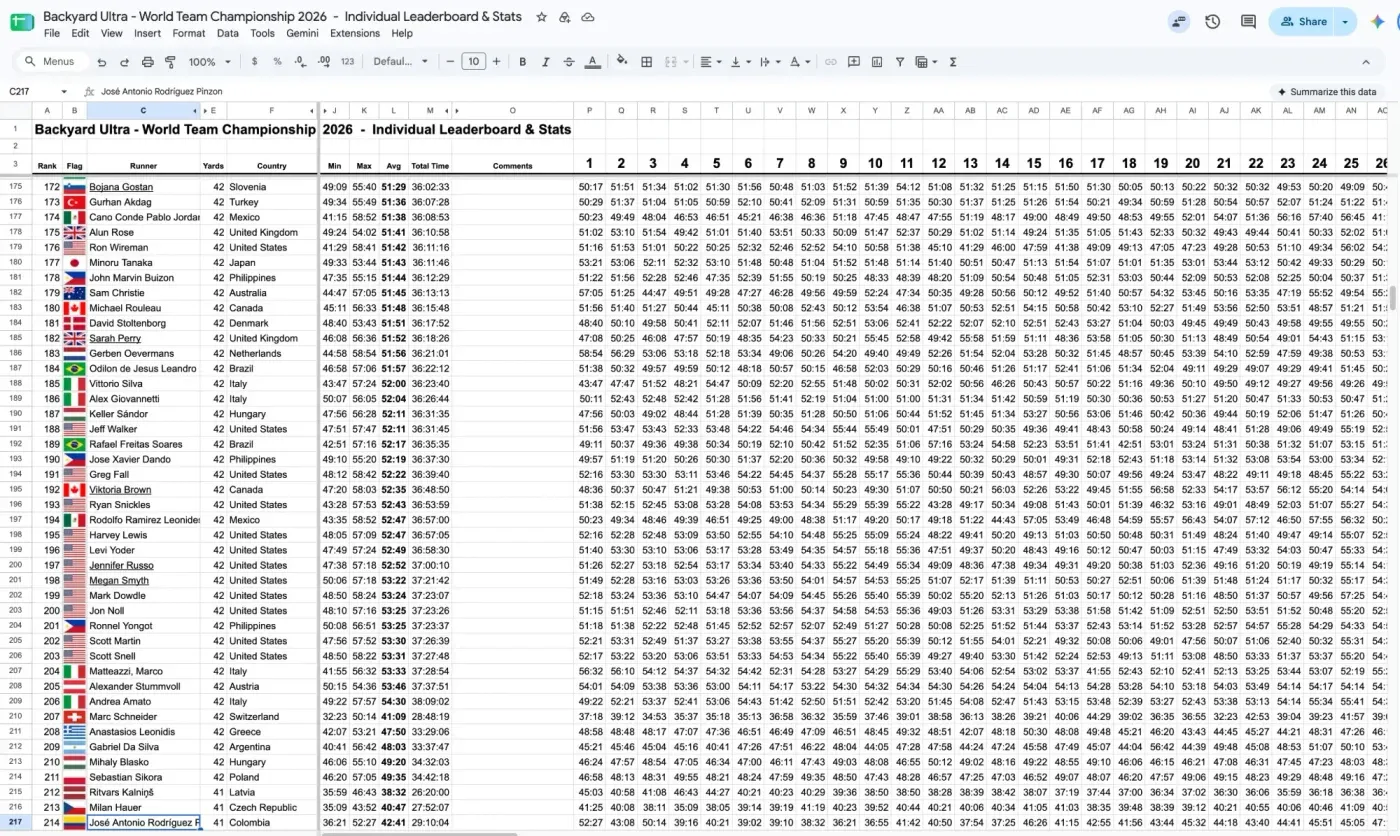
The source of truth: one row per runner, one column per yard, more than a thousand rows, typed by 67 race directors in every time zone.
It’s a remarkable piece of work, and it’s exactly right for the people who keep it. But it’s not something you can follow a race with. You can’t tell who’s leading, which nations are still running, who just dropped out, or whether a team is having a good day or a bad one. And on a phone at 3 am, it’s unreadable.
Numbers that tell a story
Look at that sheet again. On the surface, it’s pure numbers: a runner’s name, a country, and a lap time for every yard. But every row is a person running through the night somewhere in the world, and every column is another hour they chose to keep going. Those numbers have context, connections, depth and meaning. The challenge wasn’t drawing charts. It was telling that story without making it complicated.
So before designing anything, I asked myself a few questions:
- What can we actually infer from all these numbers?
- How can someone get an overview of the whole race at a glance?
- How can race directors use these numbers to see where their team stands, and how much there is to play for?
- And for the data nerds who want to dig deep, what can they explore?
Those questions shaped every choice that followed: which data to show, which charts to use, and which colours to use where.
At a glance, for everyone
Most people want three things: is my nation still running, who’s leading, and what just happened. So the Race page opens with one plain sentence, like “36 of 67 nations still running after yard 42”, before any chart. If that’s all you read, you still know where the race stands.
Nobody has to refresh, either. The page updates itself, so people left the dashboard open on a screen and kept coming back to it, and the latest numbers were always there.
For race directors
Race directors follow their own team closely. The team page shows every runner yard by yard, with each runner’s seed, so a director can see at a glance which of their strongest runners are still in. They could also see the gap to their rivals: where their nation stood against the others in its class and the nations just above it. And because every page is public and works on a phone, they could share it with their community: fans, families and the runners’ home towns.
For the data nerds
For anyone who wants to dig deeper, there’s a lot to explore: a time machine that shows the whole dashboard as it was after any yard, a grid of every runner in the race, a searchable runner leaderboard, comparisons with past championships, and a short data story, “It takes fifteen”. Every chart also has a “view as table” version with the exact numbers.
Choosing what to show, and how
- Colour with meaning. Big’s gold is used only for the leader and the live yard. Red is used only for “out”. Everything else is a calm grey. When colour appears, it’s telling you something.
- The right chart for each question. “Who’s ahead, and by how much?” is a chart of each nation’s gap to the leader, because raw totals that all climb together are hard to compare. “When do runners drop?” is a chart of drops by yard. “Who’s running through the dark right now?” is a world map with the night moving across it.
- A sentence before a chart. The headline tells you the answer; the charts are there when you want to see why.
- Every chart has a table. For screen readers, and for anyone who just wants the numbers.
None of these were technical decisions. They were decisions about the people on the other side of the screen.
And this is what it became
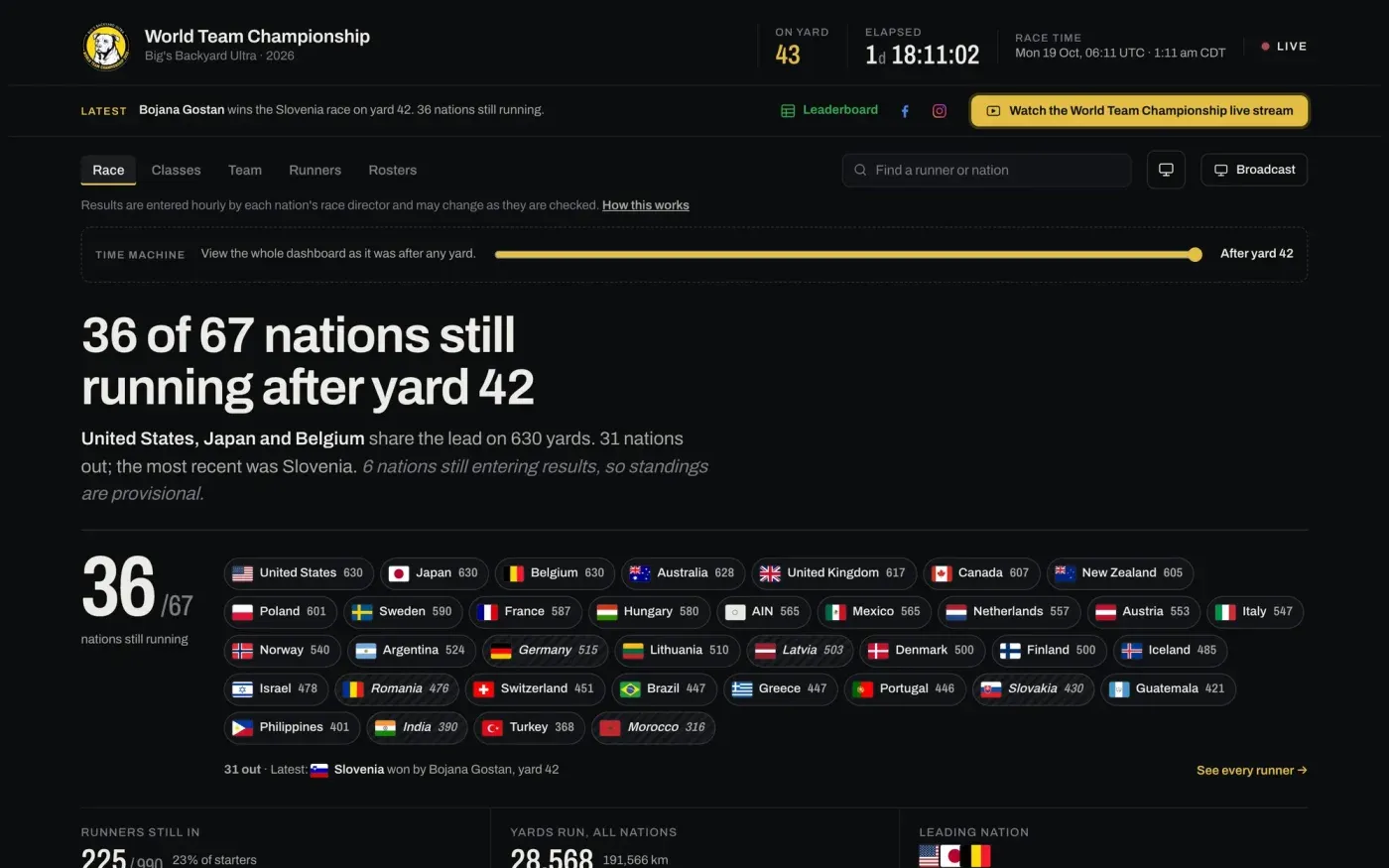
The Race page: the story of the race in one sentence, every nation still running, and a live clock. Updated every minute, automatically, from that same sheet.
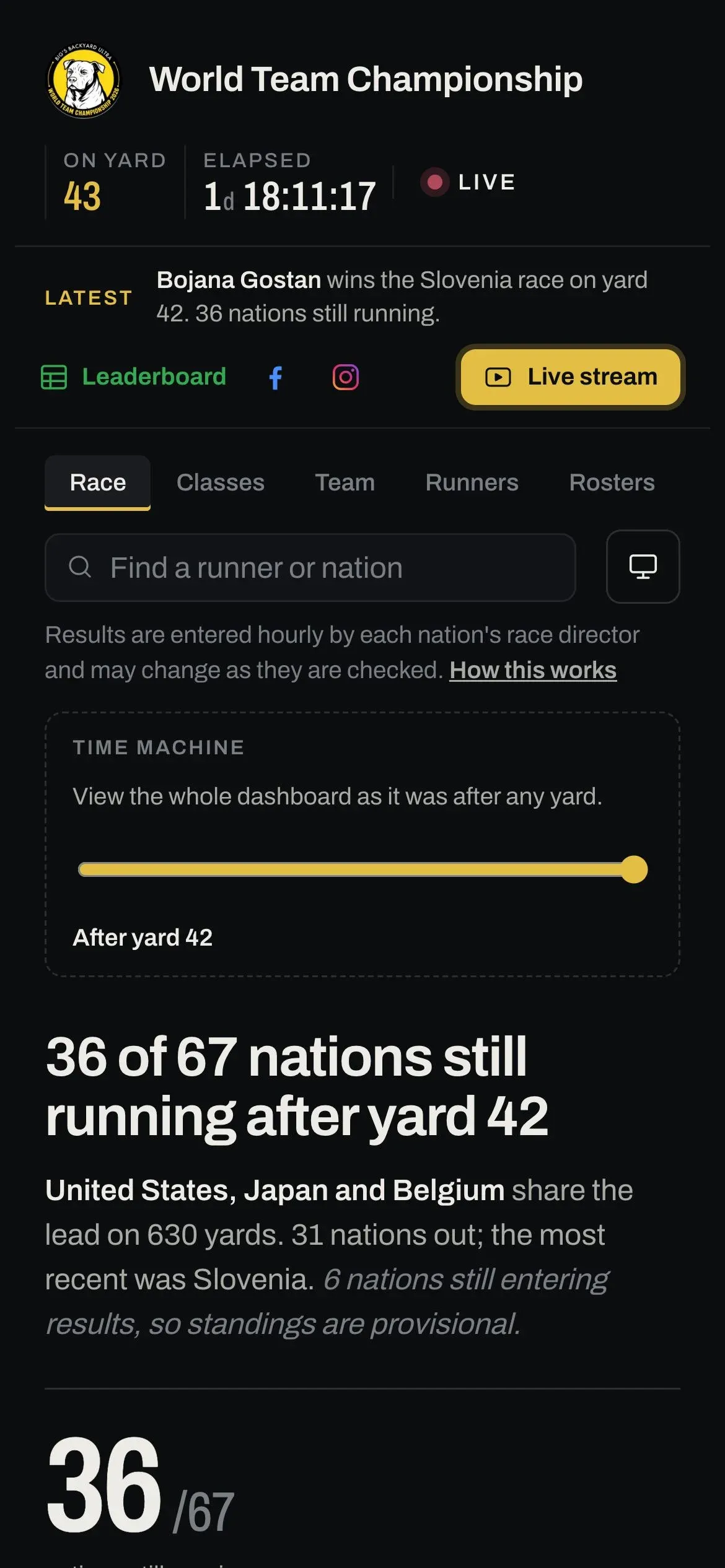
Most people follow from their phones, so every view is designed for one first.
Nobody types anything into the dashboard. The race directors keep working exactly as they always have, and the dashboard reads their sheet every minute, checks it, and turns it into something anyone can follow. When a number is corrected in the sheet, the dashboard corrects itself within a minute. There is only ever one version of the truth.
What a viewer sees
The yard in review
After every hourly bell, a recap of the yard just finished: how many made the bell, the fastest lap in the world, the runner who cut it closest to the hour, who went out and how, and every national race that ended.
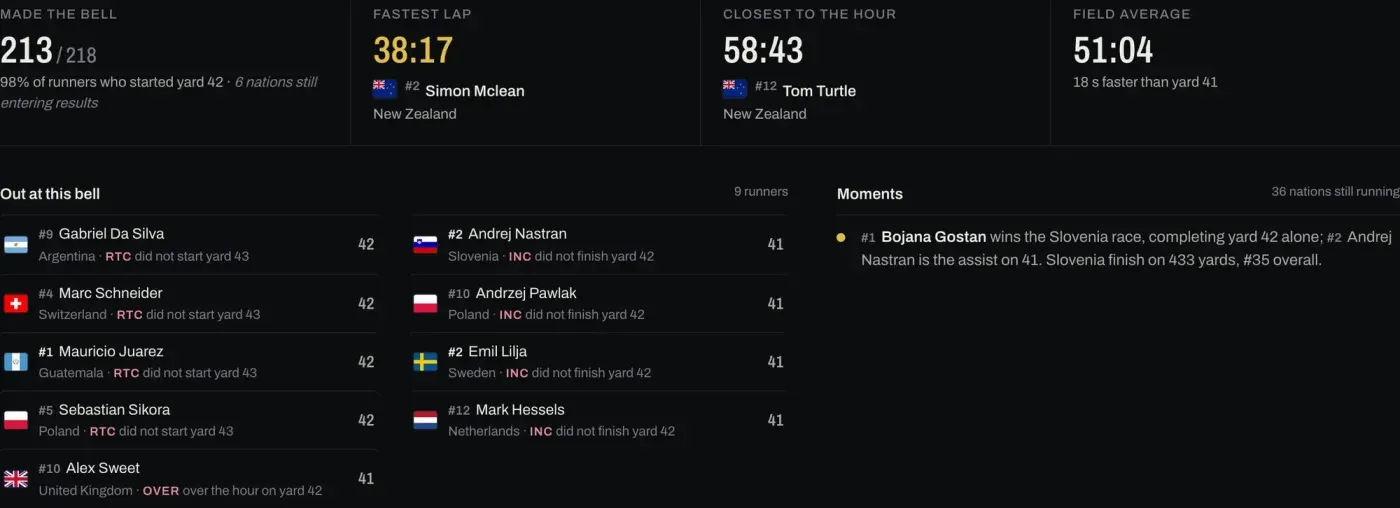
Each runner's seed sits beside their name (#1 is their team's strongest qualifier), so when a #1 or #2 drops out, you see the size of the moment at a glance. Here Slovenia's race is won by their #1, with their #2 as the assist.
Every runner, at a glance
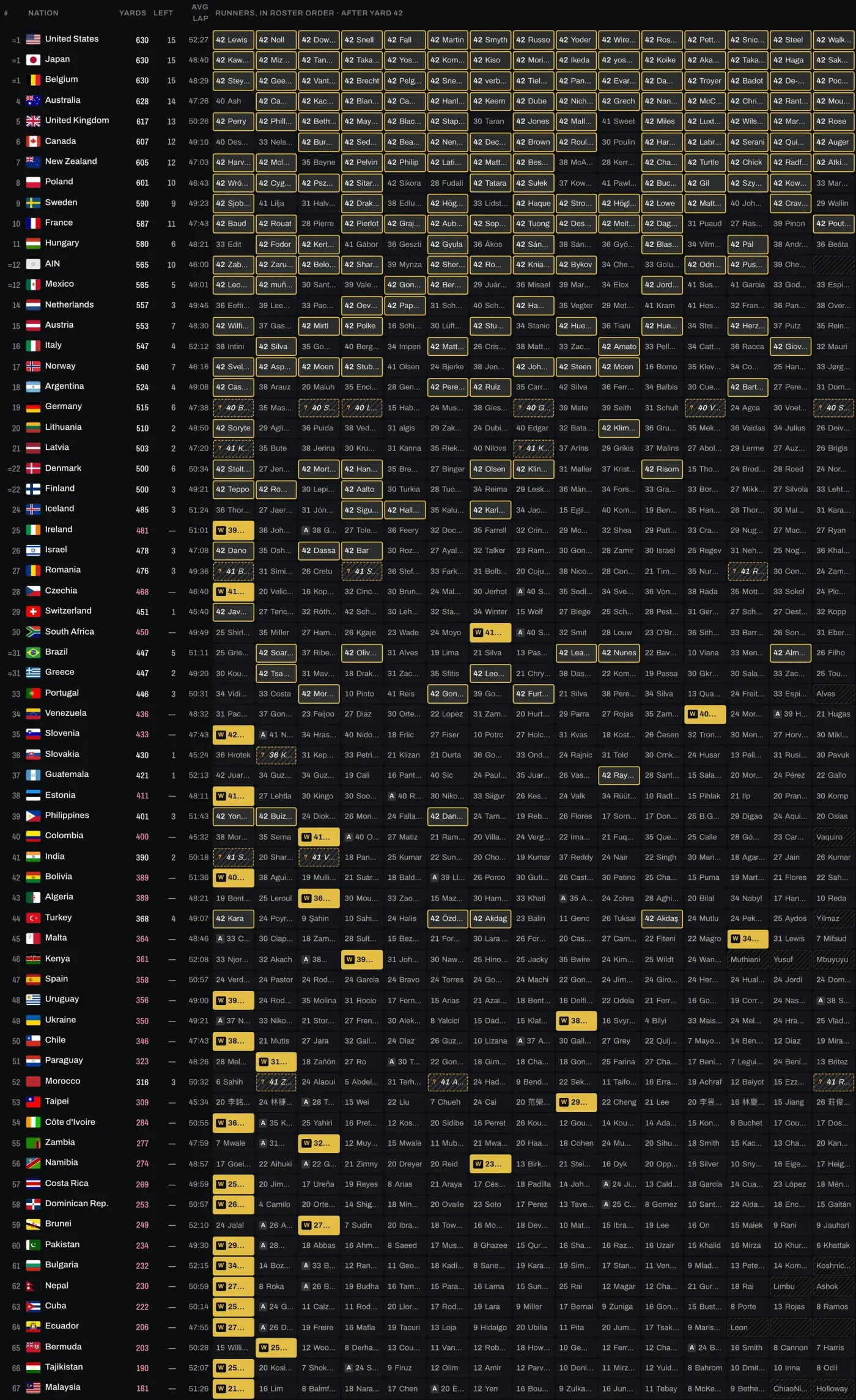
A grid of every nation and all 15 of its runners, live: running, stopped, winner, assist, awaiting results. It was the idea of the person who keeps the official leaderboard, and it became one of the most used views.
Nations in new territory
Using the official 2020, 2022 and 2024 results, the dashboard compares each nation with its own history. As the race goes on, nation after nation passes its best-ever World Team Championship total, and the recap announces each one.
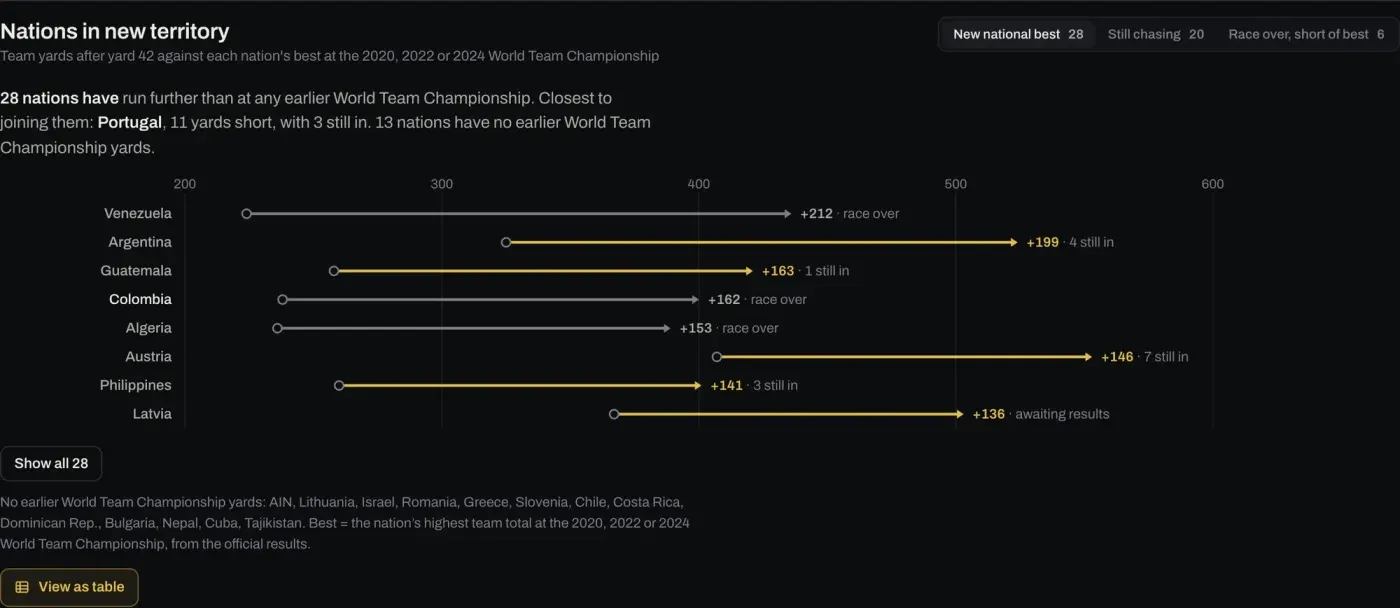
28 nations have already run further than at any earlier World Team Championship. For a race director of a smaller nation, this is the chart they share.
Your nation, everywhere
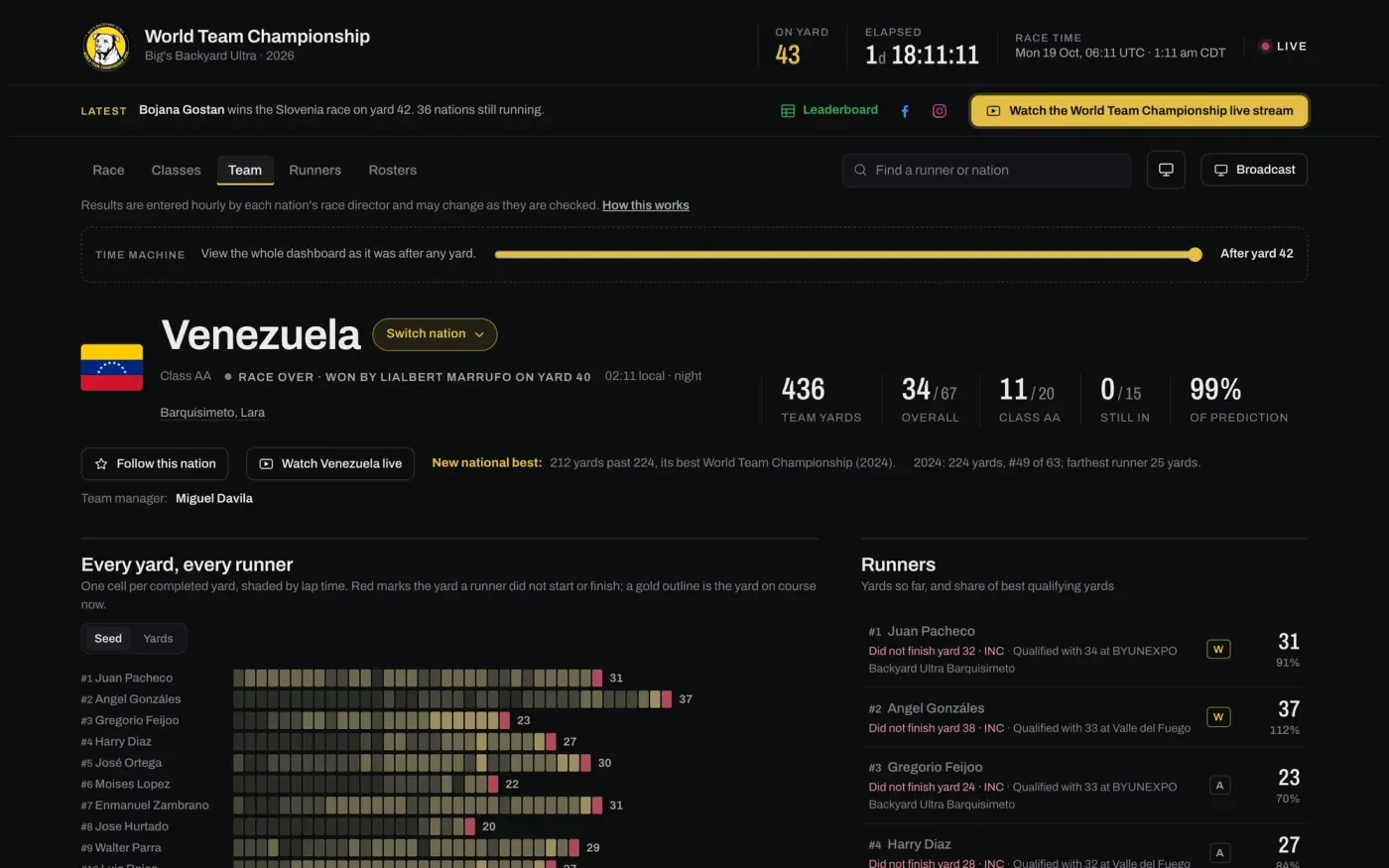
Each team page has a yard-by-yard grid for every runner, the race site’s local time, the stream link, the 2024 result and how far the team is from its best. Fans can follow up to five nations, and their rows sit at the top of the Race page.
The world, live
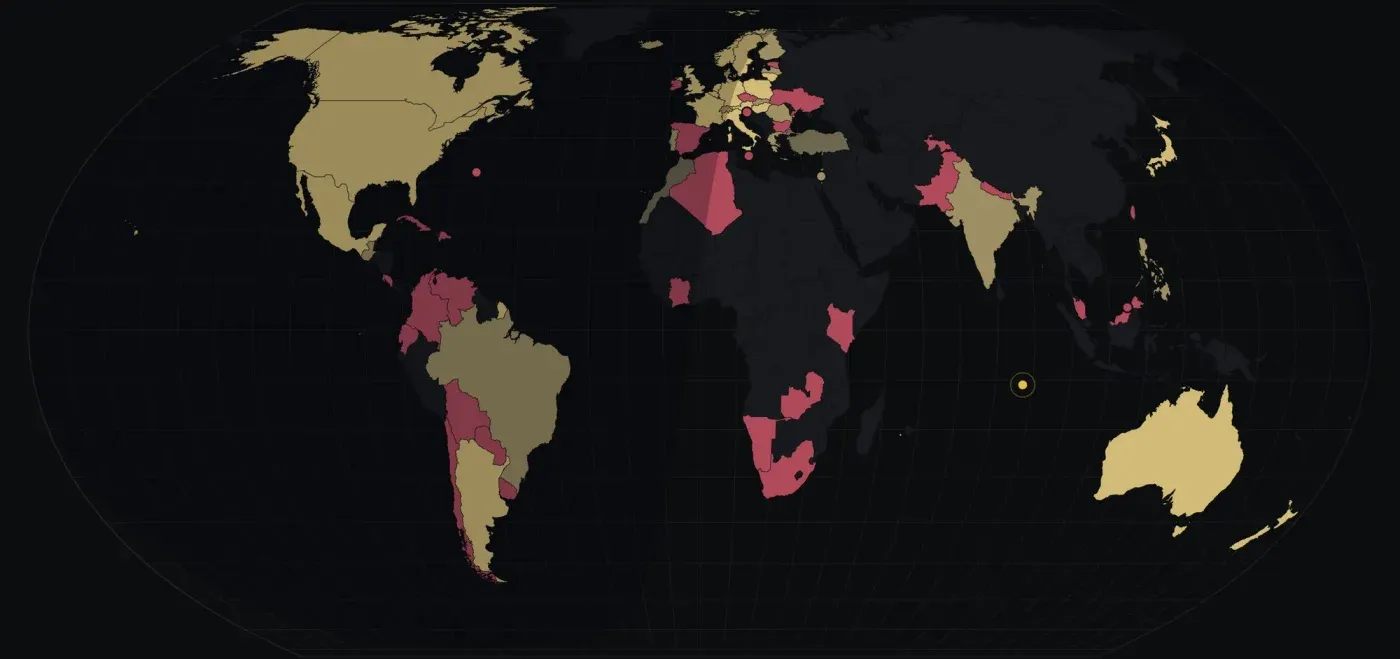
A world map shaded by team yards, with the night moving across it in real time, so you can see who is running through the dark right now.
A story, not just numbers
I also wrote a short data story, “It takes fifteen”, from the past three championships. The headline: a team title is won by depth, not stars. In 2024 the champions’ slowest runner went further than half of the national winners. Its final chart follows this year’s race live, climbing towards the record of 110 yards.
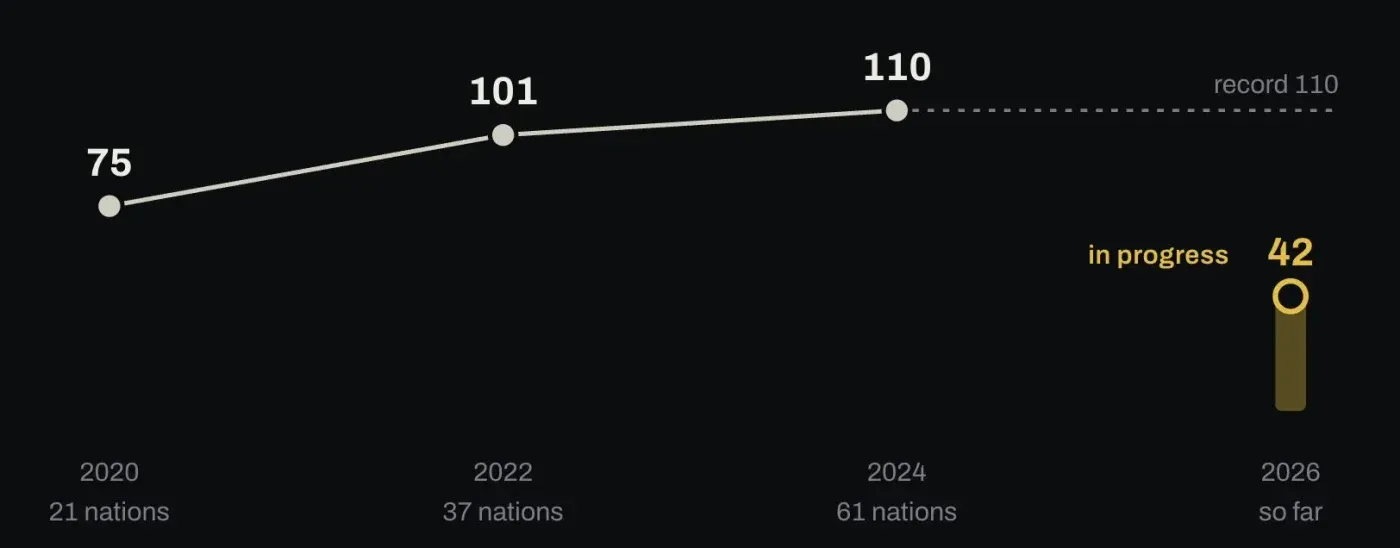
Plus: a time machine that shows the whole dashboard as it was after any yard, a hands-free broadcast mode for TVs and live streams, class-by-class standings, a searchable runner leaderboard, a “How this works” explainer one tap away, and an illustrated guide.
Under the hood, for the technically curious
If you’re here for the race, you can skip ahead to the thank-you. If you’d like to know how it works, read on.
The stack
I chose boring, fast, cheap technology that I could reason about at 3 am.
| Layer | What I used | Why |
|---|---|---|
| Front end | TypeScript + Vite, no framework; d3 for charts and the map | A results page doesn’t need a virtual DOM. Fewer moving parts, fewer surprises, fast on old phones. |
| Back end | One Cloudflare Worker | Reads the sheet, checks it, publishes one JSON file of results, and serves the app. |
| Source | Google Sheets API, read-only service account | The organisers keep working in their sheet. Nothing about their process changes. |
| Storage | Cloudflare D1 (SQLite) and KV | Published results, a refresh lock, an archive of every sheet reading (evidence for any dispute), and race-control settings. |
| Deploys | Workers Builds | Every push builds, runs the unit tests and deploys in under a minute. A failing test blocks the deploy. |
| Race control | A private admin page behind Cloudflare Access plus an admin token | Announcements, notes, stream links and fixes without touching code. |
| Monitoring | /api/health watched by UptimeRobot, plus Cloudflare analytics and logs |
An alert when visitors would see something old or wrong, and not for anything less. |
The browser never talks to Google. Every viewer checks one small, cached file once a minute. The Worker reads the sheet once a minute, behind a lock, however many people are watching. In the busiest 24 hours that meant 12 million requests and nearly 300,000 visits. Most of those are static files served straight from Cloudflare’s edge; the Worker handled about 1.2 million of them, at around 3 milliseconds of processing each, while Google saw exactly one reader. The hosting bill is $5 a month.
When something goes wrong, it shows the last good results. If Google is down, the sheet is half-edited or a tab is renamed, the Worker refuses to publish nonsense. It keeps the last good results live and raises the alarm. Stale but correct beats fresh but wrong, every time.
Getting the numbers right
The hardest part of a live sports dashboard isn’t drawing charts. It’s deciding what the numbers mean, and then making sure every single one on the screen is right.
Decide the rules before drawing anything:
- A tie is a tie. Nations level on yards share a place (
=1). Nobody is crowned “leader” by a hidden tiebreak. - Late is not out. Some race directors enter results in two minutes, some in twenty. A nation still entering results shows “awaiting results”, and is never shown as out or behind.
- Standings move at the bell. Finishes appear live as runners complete a yard, but places and totals change at the hourly bell, so every page agrees.
- Red means out, and only when a stop code is entered.
Then test what people actually see. I wrote a second, deliberately simple answer key that computes every expected number straight from the raw data, separately from the app. A real browser opens every view at several points of a simulated race, reads the numbers off the screen, and compares each with the answer key: tens of thousands of values per run.
| Test layer | Count | What it proves |
|---|---|---|
| Unit tests | 112 | Race rules, the sheet reader, the audit, the history data against the official results |
| Browser tests | 100 | Every number on screen matches the answer key; phones; both themes; accessibility (WCAG 2.1 AA); the real Worker against a fake Google having a bad day |
| Production smoke checks | 25 | Run against the live site after every deploy |
The dashboard also audits itself. Every ten minutes it compares what visitors are shown with the sheet, runner by runner, and keeps the evidence. When a race director asks “why does it say that?”, the answer is one click away.
Shipping while the world watches
I planned a feature freeze for race week. I abandoned it, because the people using the dashboard kept giving me genuinely good ideas. Since the start, I’ve shipped 46 changes during the race, every one of them through the same routine:
- All tests pass, or nothing is pushed.
- Never deploy in the minutes around the hourly bell, when everyone is refreshing.
- Wait until the new version is on every edge server, then run the production checks.
- Roll back with one click at the first sign of trouble.
And the things that shouldn’t need a deploy don’t. Race control handles them live: announcements, notes on the race chart, stream links, hiding a runner listed in error, and explaining a race that didn’t end normally.
Some of what happened along the way:
- A storm in Spain. Spain’s race was cancelled for inclement weather after 24 yards, with its runners brought in from the course. Instead of “Spain: no winner”, which reads like a collapse, race control now attaches a note to the nation: “Race cancelled due to inclement weather. Spain will re-race at a later date to decide its national winner.” It appears everywhere Spain does.
- A stray keystroke. One runner’s “RTC” became the letter “y” in the sheet. The dashboard correctly showed him as “awaiting results” rather than inventing an outcome, and race control now flags any cell it can’t read, so the race director knew exactly what to fix.
- A winner hiding in plain sight. A runner completed his nation’s final yard alone, a win by any measure, but a stop code entered afterwards made it look like “no winner”. It was caught by a sentence on the page that simply read oddly. Now a check flags that pattern within the hour.
- History, checked four times. The 2020, 2022 and 2024 totals behind “Nations in new territory” were checked against the organisers’ history workbook, the official leaderboards, the per-runner results and a summary from the leaderboard keeper. Along the way, two nations’ 2024 results on the site turned out to come from an incomplete export, and were corrected to the official figures.
- Little things that matter on phones: search that zoomed and shifted on iPhones, a clock that read “01:04:52:24” (now “1d 04:52:24”), seeds beside every runner’s name, home-screen icons, and a chart that seemed to show a decline when it was really a race in progress.
None of these were dramatic. That’s the point: when your data is typed by humans in 67 time zones, the job is to be calmly, verifiably right, hour after hour.
Accessible, secure, and fast, by default
- Every view is checked at four screen sizes, from a 320 px phone to a desktop, in both light and dark themes, with zero accessibility violations allowed. Every chart has a “view as table” version for screen readers.
- Nothing from the sheet is trusted. Dozens of people can edit it, so every name and note is escaped, and a test feeds hostile text into every field.
- Race control is locked behind Cloudflare Access and a token, and no secrets ever touch the code repository.
- It’s fast: static files cached at the edge, a results feed that answers “nothing new” in zero bytes, and a world map that only loads when you scroll near it.
Working with an AI pair programmer
I built this with Claude Code as my pair, and the habits mattered more than the code:
- A living handoff document, updated with every change: what’s live, every decision and why, what to do when something goes wrong, and lessons learned.
- Tests as the contract. “Make every number on screen match the answer key” is a far better instruction than “make it work”, for a person or an AI.
- Facts are verified, never guessed. Every figure I quoted on air was checked three ways first: the site’s own logic, an independent calculation, and the live page.
- Clear boundaries. It never contacted anyone on my behalf, and secrets stayed out of the code and the conversation.
My job was the judgement: what a fan needs at 3 am, what a tie should mean, and which idea was worth shipping during a live race and which could wait until after it.
Thank you
Mike Dobies looked after the Google Sheets side: collecting each race’s results, consolidating them into the master sheet and checking them for errors. The dashboard stands on that work. And thanks to my friends and awesome race directors Sarah Smith, Dawn Stone and Sandra Cantrell for doing the user acceptance testing (UAT) before the start.
By the numbers
- A couple of months of planning and design, then 4 days from the first line of code to the start; 138 changes shipped, 46 of them during the race
- 67 nations, 990 starters, results read every minute from the official sheet
- 12 million requests and nearly 300,000 visits in a single day, at $5 a month
- 112 unit tests, 100 browser tests, 25 production checks on race morning, run before and after every release
- 4 screen sizes × 2 themes, zero accessibility violations
- 1 source of truth. Never fixed by hand.
By the time the race ended on 22 October, the dashboard had been opened about 2.4 million times from 158 countries and territories, with 898,000 visits on the busiest day. The full numbers are in the follow-up post.
Have a spreadsheet that deserves an audience?
If you’re a race director, event organiser or federation, or any team whose results live in a spreadsheet, this is what it can become:
- Live results your audience will actually follow, on any phone, in any time zone.
- No change to how your team works. You keep your sheet; the dashboard follows it.
- Numbers you can stand behind. Every one checked against the source, with evidence for every dispute.
- Built fast and reliably: with the planning done ahead, this one was built and shipped in four days before a world championship, then improved every few hours during the race, with two short hiccups handled within minutes (what happened).
- Affordable to run: this one costs $5 a month to host.
It doesn’t have to be a backyard ultra. Ultras, relays, multi-day events, team challenges, leagues: anything with results, standings and people who care about them.
I’d love to hear what you’re planning. Let’s talk →
Enjoying it? Fuel the next yard ☕